Nursery staff training, without the spreadsheet chase
Keep safeguarding, paediatric first-aid and qualification evidence organised across your settings. See the next renewal and missing certificate, with automatic reminders to help your team follow up.
14-day Growth trial. No card. No automatic paid subscription.
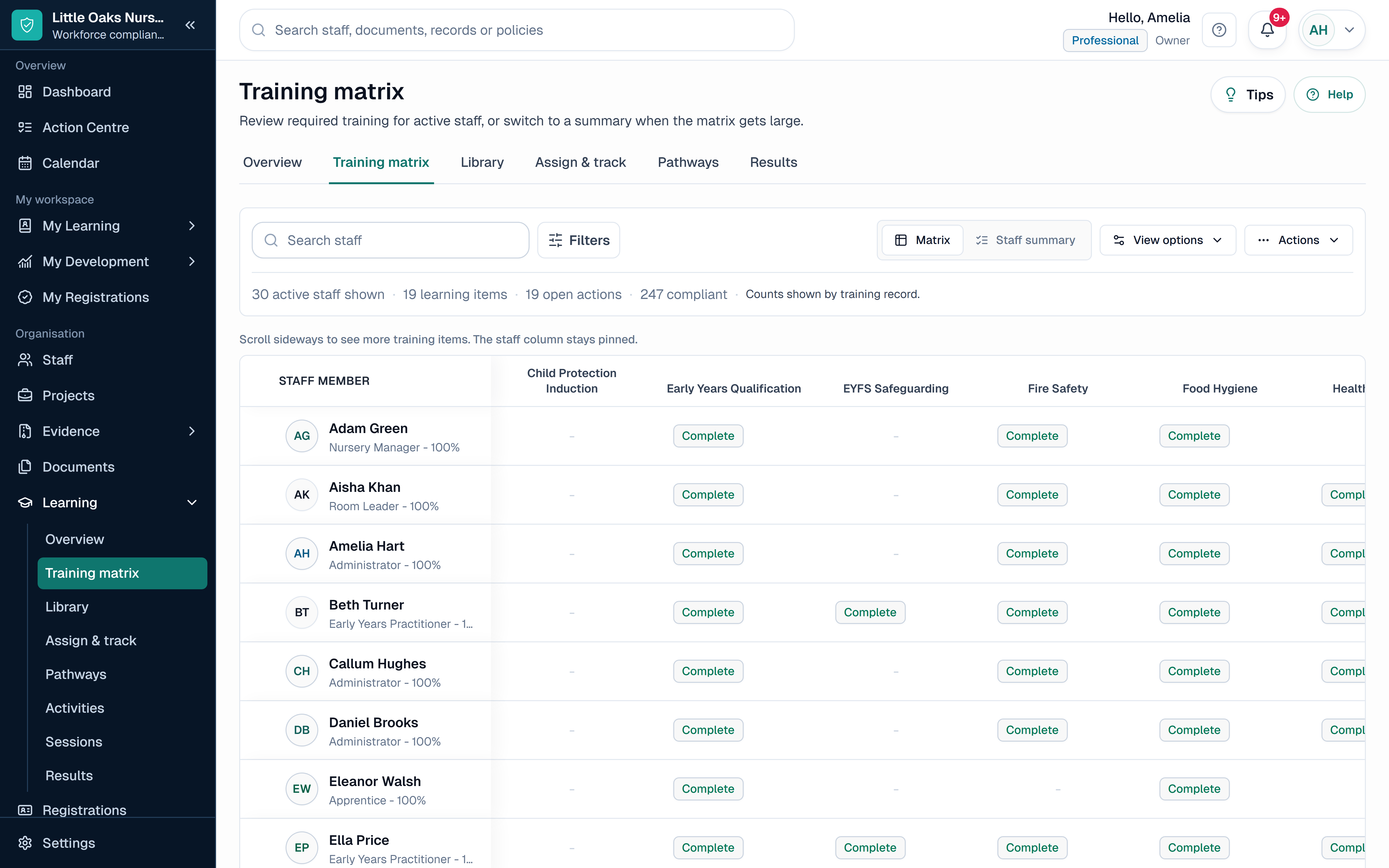
SkillProof Training Matrix
Product screenshot with fictional records. Features vary by plan.
EYFS induction and safeguarding
Paediatric first-aid renewals
Qualification evidence and review
Setting-level and group oversight
Start with the gap in your current process
Keep your nursery system. Lose the separate training chase.
Already using nursery-management software? Check what it covers first. SkillProof is worth exploring when staff certificates, renewal dates or room-leader actions still sit in spreadsheets and folders.
What the Growth trial covers. Try the Training Matrix, staff evidence uploads, automated training reminders, manager views, Document Management and Audit Pack. Start with a small set of fictional staff and one record from request to report, then decide whether it saves you work.
Choose by need, not sector. Starter covers core training records and standard reminders for one site. Growth adds wider documents, managers, CSV imports and Audit Pack. Professional adds the dedicated Competence workflow and configurable governance. Growth Activities retain their own review and sign-off features.
Documents, integrations and setup: what to expect
Documents: keep training certificates against training records. Use Growth Document Management for wider staff and organisational files, categories, access and review dates. Qualification evidence and staff policies stay separate from children's records. Choose what you need to retain and who can access it.
Existing learning providers: SkillProof can also deliver your own internal courses. CSV exchange, APIs and webhooks are different from a working automatic provider connection. Tell us your provider and the records you want to transfer; we will confirm the available route before you rely on it.
Setup: Keep your nursery context, then configure the general starter around your rooms, roles and requirements. There is no pre-approved nursery compliance pack. Bring questions, not confidential staff files, to the walkthrough. The provider remains responsible for its requirements and review decisions.
A connected early years workforce record
From early years role to reviewable staff evidence
The provider sets what applies. SkillProof keeps the selected requirement, date, evidence and next action connected.
Set the role
Choose the setting, room and role, then confirm the provider's training and evidence rules.
Add the proof
Record completions, certificates, qualification evidence and renewal dates for the person.
Act on the gap
Use automatic training reminders and the Action Centre to follow up missing certificates, upcoming renewals and review actions.
Prepare the record
Export a scoped Audit Pack from the current records for the setting or group.
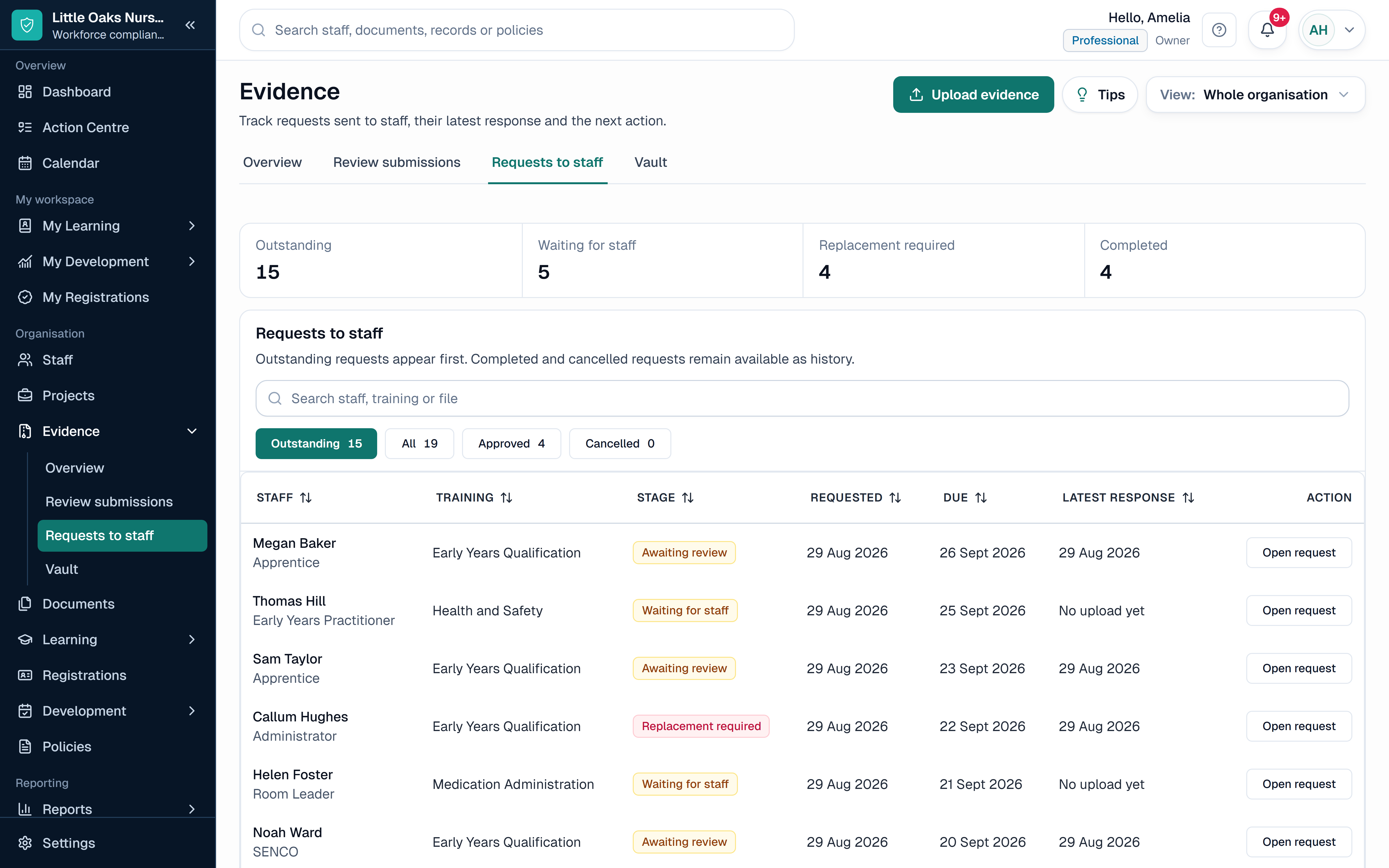
SkillProof Evidence and certificates
Find the certificate. Follow up the renewal.
Request a missing certificate, review the upload and keep the evidence with the staff record it supports. Automatic training reminders help your team follow up on the dates you record.
Missing, requested and review status
Certificate and qualification evidence
Clear renewal or follow-up action
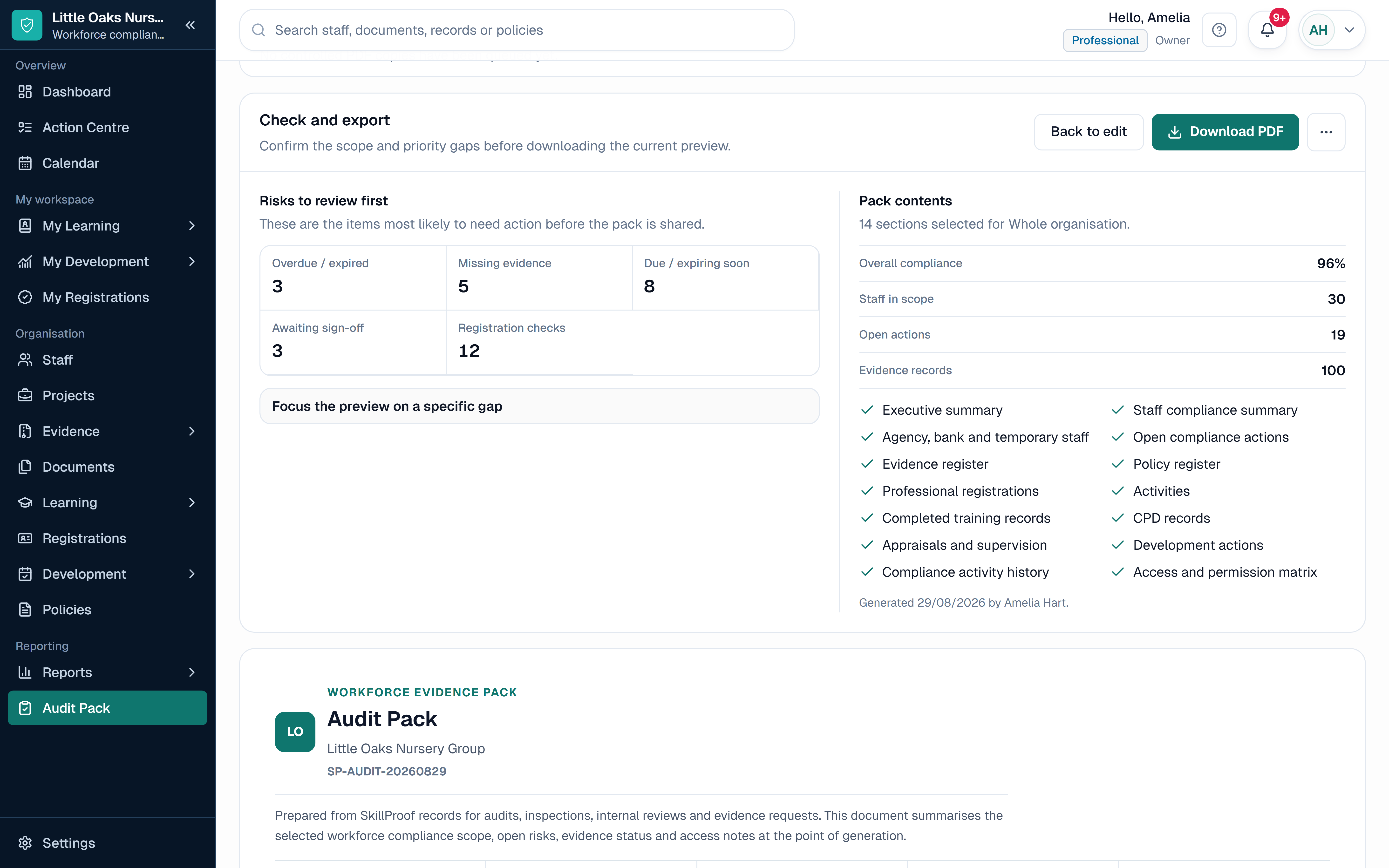
SkillProof Audit Pack
Prepare inspection evidence from current records.
Build a scoped Audit Pack for one setting or the wider group from current training, evidence, qualification and action records.
Safeguarding and induction by role
First-aid and qualification evidence
Open gaps before inspection day
Early Years feature coverage
Keep the certificate and renewal in reach.
Connect safeguarding, first aid, qualification evidence, competence, renewals and inspection preparation without another setting spreadsheet.
Training Matrix and Role Requirements
Apply provider-defined requirements by role and setting, then see current, due, overdue or missing-evidence status.
Evidence and Certificate Tracking
Request, review and retain the document against the exact completion or requirement it supports.
Qualification Evidence and Manual Review
Keep qualification evidence, review notes, relevant dates and the next manual check on the staff record.
Induction and Competence Sign-Off
Growth Activities support review and sign-off. Professional adds the dedicated Competence workflow and configurable governance for the provider's own assessment process.
Renewal Reminders and Manager Actions
Surface due-soon, overdue and missing records with a clear owner before review or inspection day.
Reports and Audit Packs
Export a current setting or group view from training, evidence, qualification and action records.
Clear ownership at every level
Local action with a clear group-wide view
Nursery and setting managers
See current training, certificate and qualification evidence for the staff in their setting.
Room leaders and deputies
Follow up assigned staff and missing evidence without keeping a separate room tracker.
Quality and group operations
Compare settings against a consistent record structure and inspect the underlying evidence.
Where SkillProof fits.
SkillProof manages provider-defined workforce training, evidence, qualification, renewal and follow-up records. It does not replace nursery-management, safeguarding, incident, recruitment or DBS-checking systems, decide which requirements apply, provide legal advice or guarantee an Ofsted outcome.
Yes. Starter includes standard automated training due and overdue reminders for the dates you record. Growth adds configurable and cross-module reminders, manager access and multi-setting oversight. Keep the supporting certificate and next renewal date with the staff record so managers can review the follow-up.
Can SkillProof track safeguarding and EYFS induction records?
Yes. Early years providers can configure induction, safeguarding and refresher requirements by role, setting, team or person, then keep the completion, date and evidence together. The provider decides what applies.
Can it track paediatric first-aid certificates?
Yes. Record the certificate, completion or issue date, renewal date, evidence and follow-up action against the relevant staff member. SkillProof does not decide which staff must hold a qualification or whether deployment requirements are met.
Can we keep qualification evidence on the staff record?
Yes. Keep the qualification name, relevant date, supporting document and internal review status with the person rather than relying on a note in a separate spreadsheet.
Can it keep supervision and policy follow-up visible?
Yes. Record supervision outcomes, development actions, owners and review dates, and keep policy versions and acknowledgements with the intended workforce audience. Acknowledgement does not by itself prove understanding.
Does SkillProof replace our nursery-management or DBS system?
No. SkillProof focuses on workforce training, evidence, qualification records, policies, supervision actions and renewals. It does not replace child records, safeguarding, incident or DBS-checking systems.
Does SkillProof guarantee EYFS compliance or an inspection outcome?
No. SkillProof helps organise current workforce records and evidence for review. The provider remains responsible for legal and regulatory duties, suitability, ratios, qualification decisions and inspection preparation.