Training, policy and development records for HR teams

Keep training, policies and appraisal actions connected from day one to review day

Give HR one current view of role-based training, policy acknowledgements, appraisal actions, evidence and renewals. Managers see what they own; HR keeps the wider workforce position without rebuilding it for every review.

14-day trial. No card. Use test data first.

What managers can check

  • Requirements applied through roles, sites and departments
  • Policy versions, acknowledgements and review dates connected
  • Appraisal actions kept visible with an owner and due date

SkillProof workspace

Action Centre
Product view
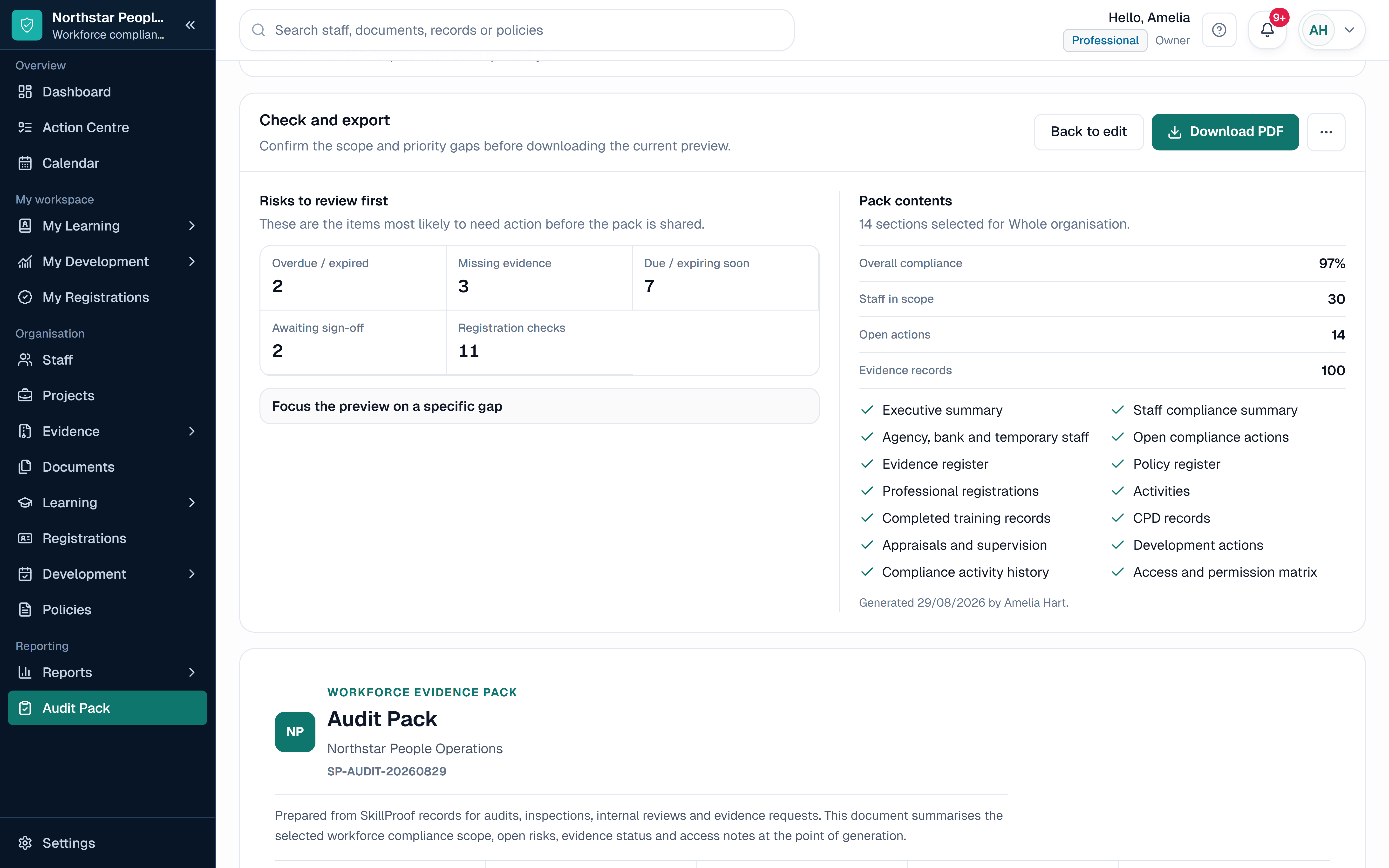
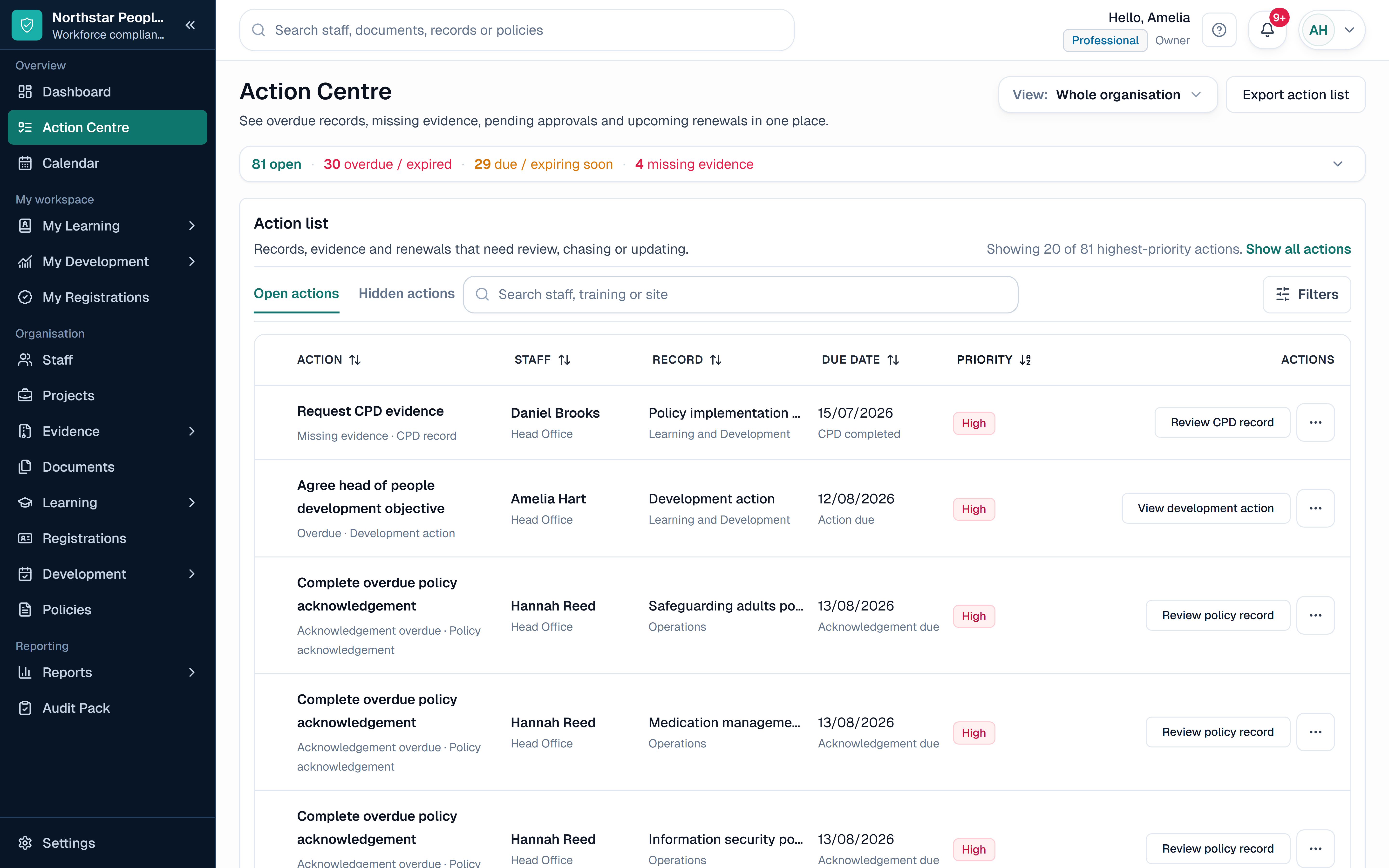
SkillProof Action Centre showing fictional overdue, due-soon and missing workforce records using safe demo data.
  1. 1

    One action view

    Bring overdue training, missing evidence, renewals and review actions into one prioritised list.

  2. 2

    Manager ownership

    Give managers the actions for their assigned staff while HR keeps the organisation-wide view.

  3. 3

    Current status

    Work from connected records instead of reconciling several spreadsheets before a review.

Plain-English answer

SkillProof in brief

SkillProof connects the workforce training, policy, appraisal, evidence and renewal records that HR teams often manage across spreadsheets, inboxes and shared folders.

Who it is for

  • HR and people teams in growing organisations
  • Multi-site employers with local line managers
  • Training, compliance and operations leads

What it tracks

  • Training requirements assigned by role, site or department
  • Policy versions, owners, review dates and acknowledgements
  • Appraisal outcomes, development actions, evidence and renewals

What it does not do

  • It does not replace payroll, recruitment or a core HRIS
  • It does not decide employment, legal or regulatory requirements
  • It does not guarantee compliance or a successful audit

Why organisations replace spreadsheets

Staff, role, requirement, evidence and action records stay connected, so HR does not have to reconcile several trackers before every review.

How it differs from an LMS

SkillProof records requirements and evidence from any training route. It does not deliver a course catalogue or replace an LMS.

Sector pressure

What HR and people teams need to keep visible

HR teams are often asked for a current training matrix, policy acknowledgement position or appraisal action list, but the answer sits across spreadsheets, shared folders, inboxes and manager notes.

The risk is not only an overdue course. It is a role change that never updates the requirement, a new policy version nobody can evidence, or a development action with no owner or due date.

01

Role and organisational changes: keep requirements aligned when a person joins, changes role, site or department, or leaves.

02

Policy control: keep the owner, current version, review date and staff acknowledgement tied to the same record.

03

Appraisal follow-up: turn review outcomes into named development actions with owners, dates and evidence.

04

Manager accountability: give line managers the actions for their teams while HR retains organisation-wide oversight.

Connected workflow

From role requirement to owned workforce action

The record remains useful when organisational structure, requirement, evidence and follow-up stay connected.

  1. Step 1

    Set the structure

    Create sites, departments and roles, then confirm which records each group needs.

  2. Step 2

    Apply the records

    Assign training, policies, evidence and review requirements to the relevant people.

  3. Step 3

    Give managers action

    Route missing records, due dates and development actions to the responsible manager.

  4. Step 4

    Review and report

    Use current status, reports and Audit Packs instead of rebuilding the position.

Records to manage

The HR records that need a clear owner, date and status

Keep each record distinct while connecting it to the person, role and manager responsible for the next action.

Record

Role-based training

What sits against it

Requirement, completion, evidence, renewal date and the role or group that assigned it.

What managers review

Complete, due soon, overdue or missing evidence

Record

Controlled policy

What sits against it

Policy owner, version, review date, relevant audience and acknowledgement history.

What managers review

Current version, review due and outstanding acknowledgements

Record

Appraisal and development

What sits against it

Review outcome, objective, development action, owner, due date and supporting record.

What managers review

Open actions, ownership and completion

Record

Evidence and renewal

What sits against it

Certificate or supporting document, internal review status and next renewal date.

What managers review

Evidence accepted, renewal due or follow-up required

Feature by feature

How SkillProof handles the work

Four connected areas replace the hand-offs between the training matrix, policy log, appraisal notes and manager action list.

1

Training by Role

Specific problem

Joiners, role changes and site moves make a static training matrix difficult to keep aligned with the current workforce.

How SkillProof helps

Apply requirements through roles, sites, departments or individuals and review current status from connected records.

2

Policy Management

Specific problem

Owners, versions, review dates and staff acknowledgements often sit in separate files with no current workforce view.

How SkillProof helps

Keep the controlled policy, relevant audience and acknowledgement history together with clear review dates.

3

Appraisals and Development

Specific problem

Objectives and development actions can disappear into review notes once the appraisal meeting has finished.

How SkillProof helps

Connect the agreed action to the staff member with an owner, due date, status and supporting evidence.

4

Action Centre and Audit Packs

Specific problem

HR and managers can see different fragments of the position and rebuild reports before every formal review.

How SkillProof helps

Work from one prioritised action view and export a scoped pack from the records already held in SkillProof.

Inside SkillProof

See this SkillProof view in context: Appraisals and development

The product view shows the current record and the follow-up it creates. It is demo data, not a claimed sector result.

SkillProof workspace

Appraisals and development
Product view
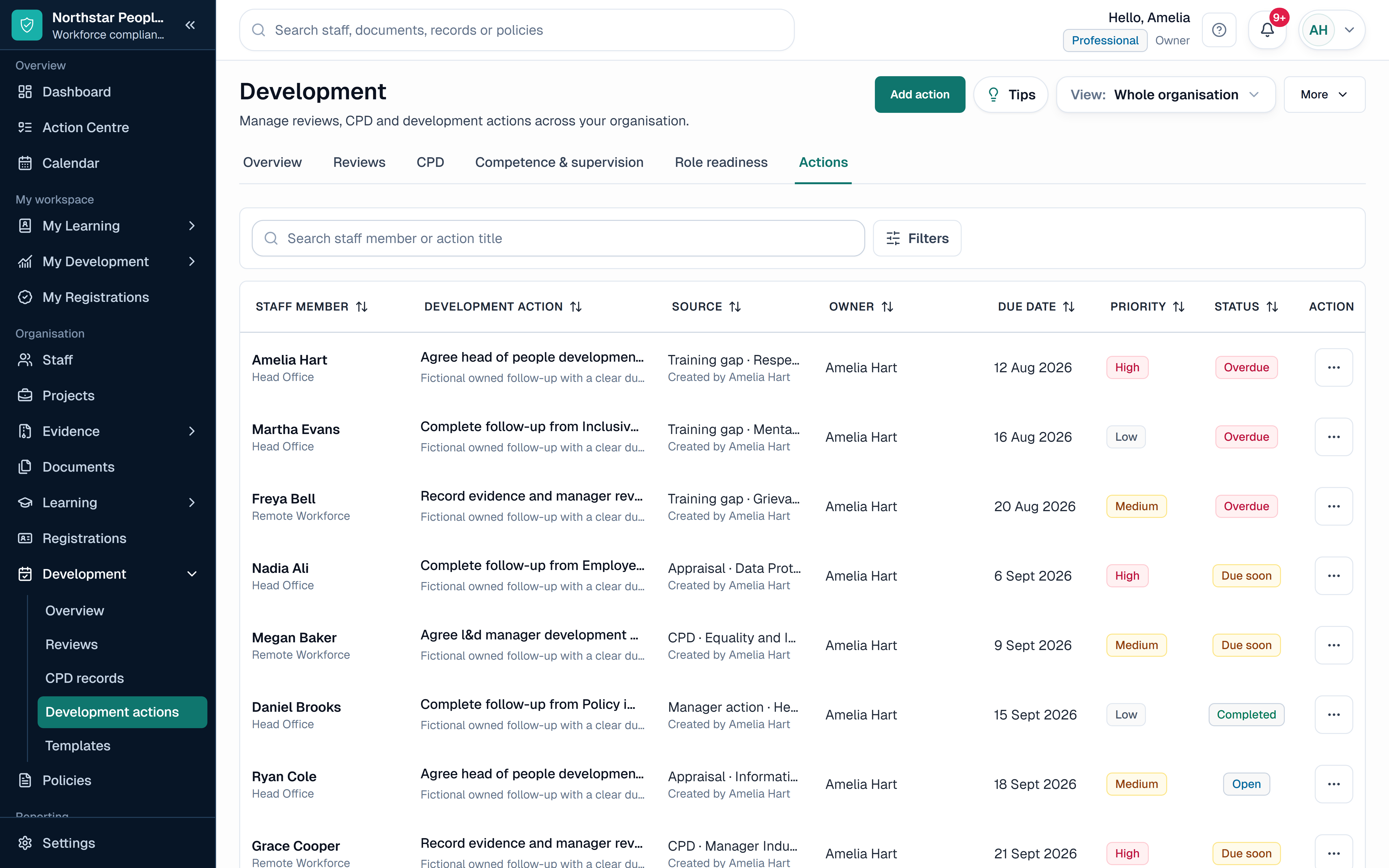
SkillProof development view showing fictional appraisal outcomes and development actions using safe demo data.
  1. 1

    Outcome to action

    Keep the appraisal outcome, objective and follow-up action connected to the person.

  2. 2

    Owner and due date

    Make the agreed next step visible with ownership, status and supporting evidence.

Who uses the view

One workforce record, viewed at the right level

HR retains the organisation-wide position while managers work from the people and actions within their assigned scope.

HR and people teams

Set the record structure, see gaps early and report without maintaining parallel trackers.

Line managers

Review training, evidence, policy and development actions for the people they manage.

Operations and compliance

Compare sites or departments and inspect the underlying evidence when follow-up is needed.

Questions

HR & People Teams questions

Straight answers about what SkillProof records, what your team remains responsible for and how the workflow works.

Does SkillProof replace our HR system?

No. Your HRIS, payroll or recruitment system remains the source for employment data. SkillProof focuses on the connected training, policy, evidence, appraisal, development and compliance records that need active follow-up.

Can requirements change when someone changes role?

Yes. HR can assign requirements through roles, sites, departments or individual rules, then review the resulting training and evidence position when a person's assignment changes. Your organisation decides which requirements apply.

Can SkillProof track policy acknowledgements?

Yes. Keep the policy owner, version, review date and relevant audience visible, then record which staff have acknowledged the controlled version.

What happens to actions agreed in an appraisal?

Record the objective or development action, owner, due date, status and supporting evidence so the follow-up remains connected to the staff record.

Can line managers see only their teams?

Manager access can be scoped to assigned staff and teams, while authorised HR or organisation owners retain the wider view supported by their role.

Does SkillProof provide HR or legal advice?

No. SkillProof organises the records and actions your organisation chooses to manage. It does not decide employment or legal requirements and does not guarantee compliance.

Next step

See the HR workforce record without rebuilding it.

Start with safe test data and review training, policies, evidence, appraisal actions and renewals in one connected workspace.

No card required. 14-day trial. Start with test data first.